Traders & markets

Fill your site with the right mix of traders

Fai, your AI teammate, ranks trader applications against the mix you want, and you approve the best.

A small team that works like a big one.

  • No credit card required
  • The Event Operating System on every plan, Free included
  • Unlimited events with no monthly fee
Ticket Fairy Event Operating System: Traders & markets
  • The right trader mix, ranked by Fai
  • Paperwork and payments in before load-in
  • Your share of sales worked out

Choose the right traders and have them ready for load-in

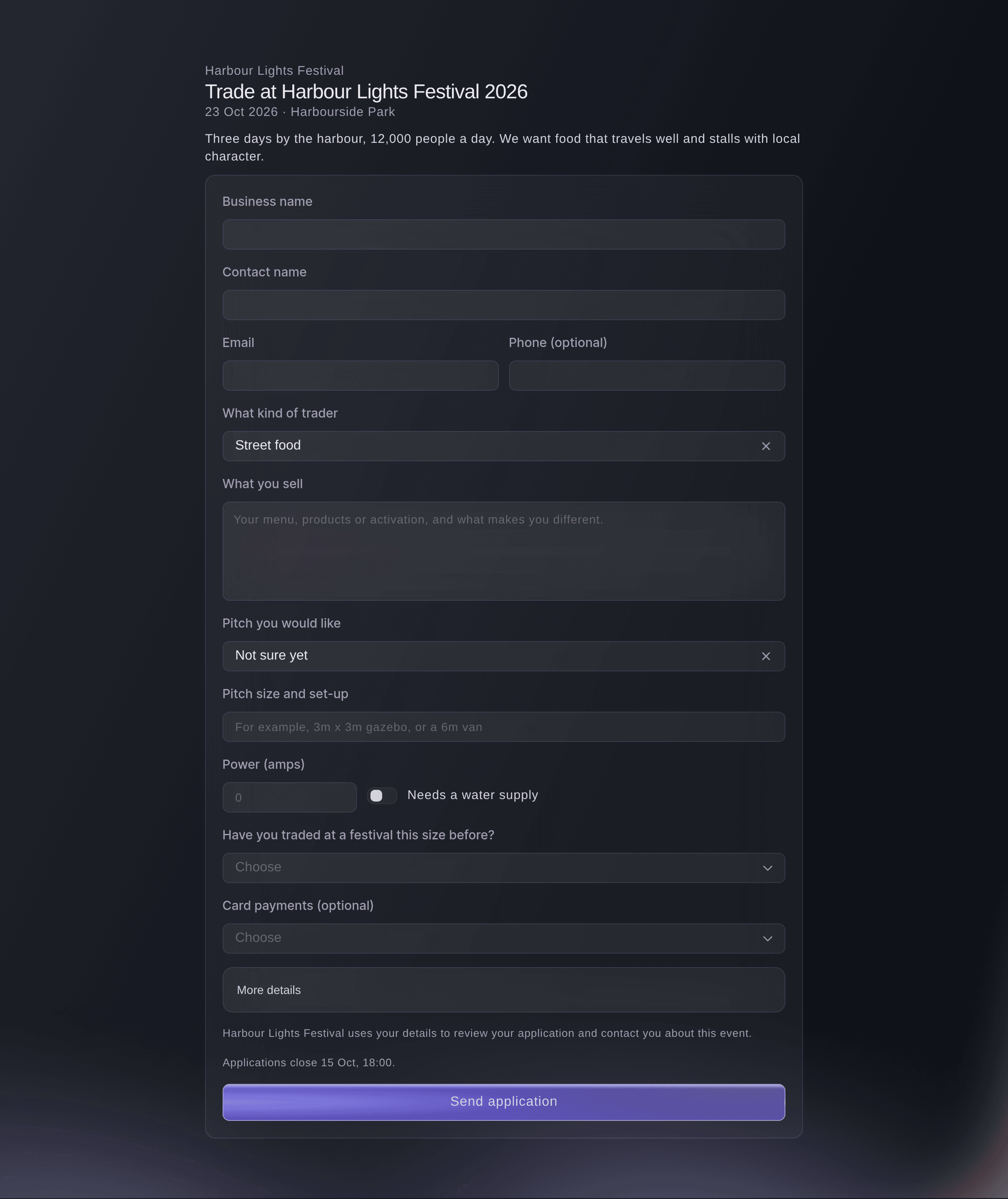
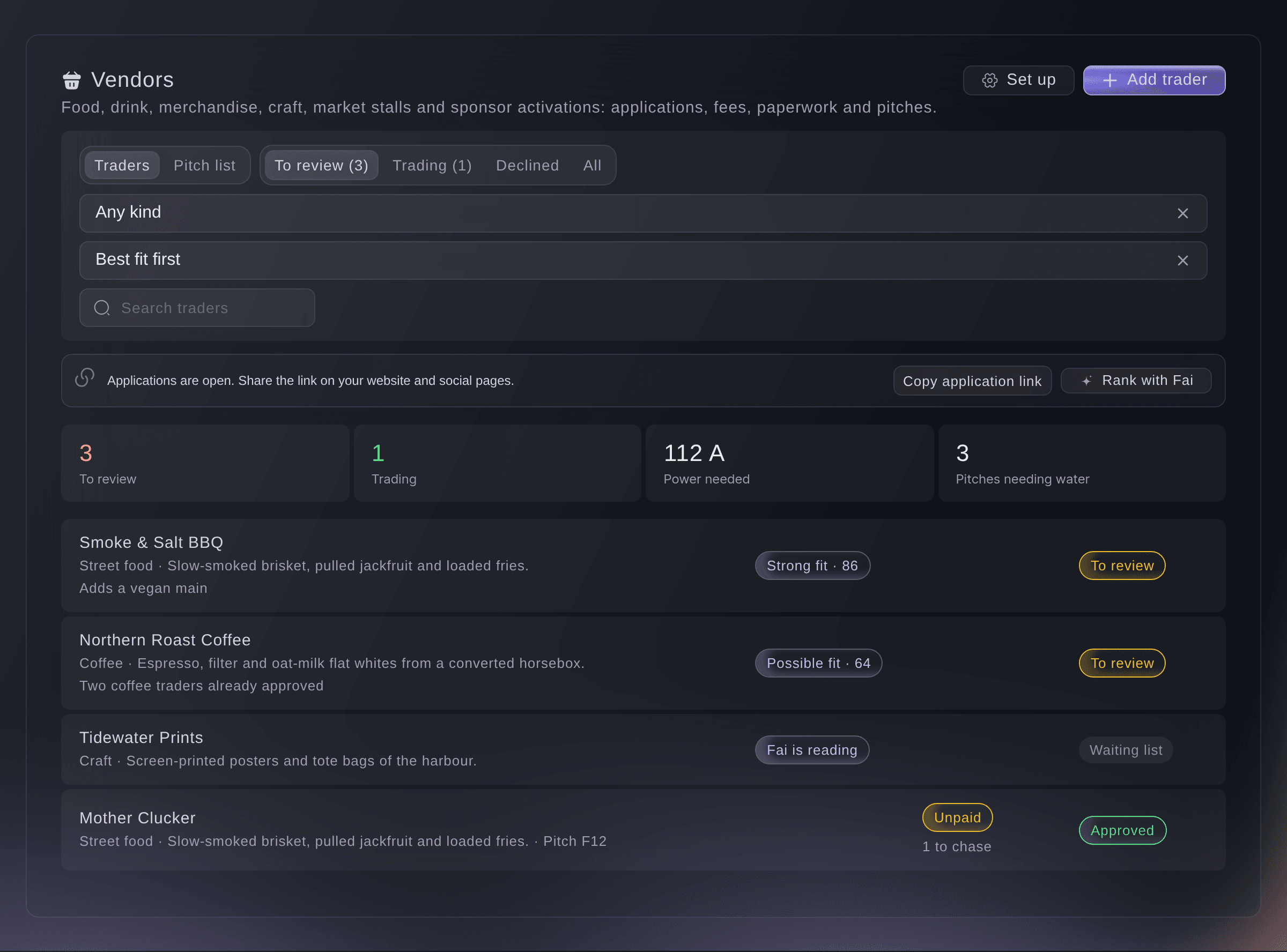
Traders apply on your public application page, which shows your fees and tax. Fai ranks them against the mix you want, and you approve, waitlist or decline each one.

How it works

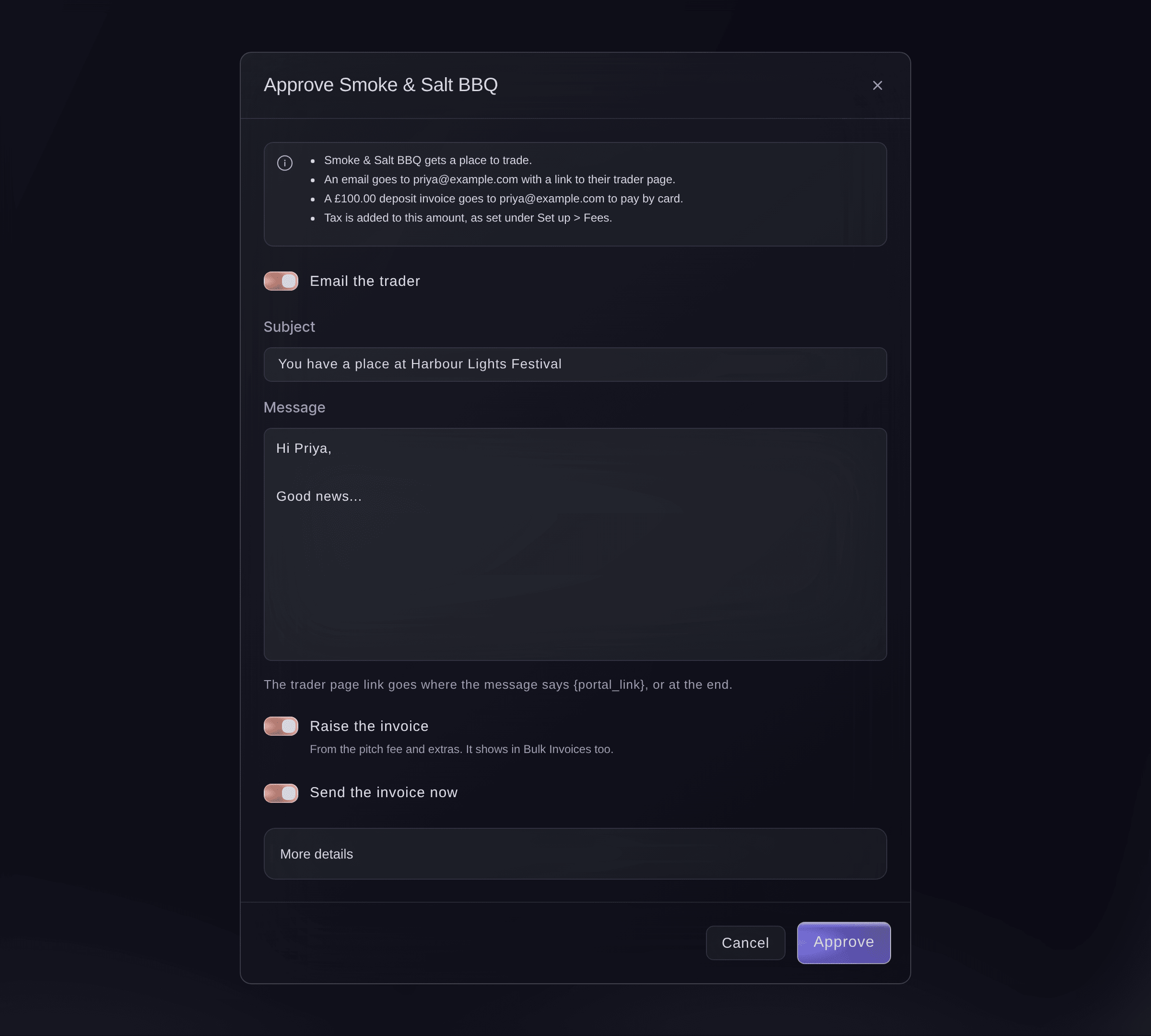
When you approve a trader, their invoice is ready and they get their own page. On that page they accept your terms, pay, book a load-in time, name their staff and upload certificates. One application can cover all dates of a market series, and you decide each date on its own.

  • Trader applications: a public page with your fees and tax
  • Ranked by Fai: against the mix of traders you want
  • Trader page: terms, invoice, load-in time, certificates and staff
Ticket Fairy Event Operating System: Choose the right traders and have them ready for load-in

Show each trader on your site map and your website

You can drag each approved trader onto a pitch on your site map. Their trader page then shows their pitch, a small map around it and their load-in time.

How it works

Load-ins appear on the run of show. Your electrician gets an up-to-date power sheet for each zone, with each trader's power and water. Traders enter their own listing for your public trader directory, and you check and publish it. The directory can go on your website, with filters.

  • Pitches on your site map: each trader sees their own pitch
  • Power sheets: a private link for your electrician
  • Trader directory: on your website, with filters by what traders sell
Ticket Fairy Event Operating System: Show each trader on your site map and your website

Invoice your share of sales from takings you can check

Traders declare their takings on their own page, with their till or card machine report. Fai checks the report and tells you whether it matches the figure they entered.

How it works

You accept it or ask the trader about it. You get the pitch fee's percentage of sales, never less than its minimum fee and never more than its maximum. The invoice goes out through Bulk Invoices.

  • Takings with evidence: the till or card machine report on each declaration
  • Checked by Fai: you accept the figure or ask about it
  • Minimum and maximum fees: applied to each trader's share of sales
Ticket Fairy Event Operating System: Invoice your share of sales from takings you can check

Place traders on their pitches by your own rules

You enter your pitch rules the way you would say them, such as keeping the coffee vans apart or the fire lane clear.

How it works

The pitch check shows each pitch that breaks a rule. Fai plans pitches for the traders still without one. Traders ask to move from their own page, and you answer.

  • Pitch rules: in your own words, understood by Fai
  • Fai's pitch plan: free pitches that keep all your rules, for you to approve
  • Move requests: traders ask, you move them or say no with a note
Ticket Fairy Event Operating System: Place traders on their pitches by your own rules

More on Traders and Markets

See how your team does each job in the dashboard, set it up step by step and get answers to your questions.

Get this page as a PDF Read it later or share it with your team. We email you a link to the PDF.
What to put in your PDF

We will email you this deck. We may also email you now and then about Ticket Fairy features that can help your events. You can unsubscribe at any time with one click.

Take each trader from application to final invoice

  • Trader applications

    You can take applications with your pitch fees, extras such as power and water, and tax. Fai ranks them with plain reasons.

  • Invoices

    When you approve a trader, their invoice is made from your fee table, and they pay it through your event's own payment processing account.

  • Trader page

    Each trader keeps their details, menu and staff up to date, accepts your terms, pays and books load-in.

  • Staff passes

    You can include staff passes in a pitch fee and offer more as an extra. Traders name their own staff.

  • Vehicle passes

    Traders book each vehicle into an arrival time and show the gate code when they arrive.

  • Certificates

    Fai finds the expiry dates on trader certificates and suggests reminders for missing or expiring ones.

  • Pitches

    You place traders on the site map, and their load-in times show on the run of show.

  • Power sheets

    Your electrician sees each zone's power and water from a private link.

  • Trader directory

    You publish the listings you check and can embed the directory on your website, with filters by what traders sell.

  • Takings and share of sales

    Fai helps you check declared takings, and you invoice your share through Bulk Invoices.

  • Market series

    You can take one application for several dates and decide each date on its own.

  • Pitch rules and Fai's plan

    Each pitch is checked against your rules, and Fai places the traders still without a pitch.

  • Move requests

    Traders ask to move from their trader page, and each new pitch is checked against your rules.

Questions about Traders and Markets

Traders & markets

No. Fai ranks applications against the mix you describe, with plain reasons. Your team approves, waitlists or declines each one.

No. Each listing shows only the name, what they sell, the kind of trader, the words people filter by, a website and an Instagram name.

No. Fai checks the reports and tells you whether they match the figure the trader entered. You accept the figure or ask the trader about it.

Yes. One application can cover several dates of a market series. You approve or decline each date on its own. On their page, the trader can say they cannot trade on a date.

No. You place one trader on each pitch on the map. If two traders share a space, draw two areas side by side.

As many as their staff passes allow. You can include staff passes in a pitch fee and offer more as an extra.

Build a stronger event business on the Event Operating System

Get started free and plan your next event today, or book a demo to see it on an event like yours.

Start free with the Event Operating System

Sign up and plan your next event, from the first advance to show day.

The Event Operating System on every plan, Free included

Unlimited events with no monthly fee

Fai drafts the admin, and you approve it

Get started free Talk to Fai Now

Ask Fai, our AI teammate, about Ticket Fairy’s features, pricing and how it could work for your event.

No credit card required

Book a demo

See the Event Operating System on an event like yours, with your team's questions answered.

45-Minute Video Call
Pick a Time That Works for You

The Ticket Fairy, Inc. is a fintech company and technology platform. The Ticket Fairy, Inc. is not a bank, financial institution, or regulated financial services provider. Vault banking services are provided through regulated banking partners. Ticket Fairy Capital financing is provided by third-party private credit partners. The Ticket Fairy, Inc. does not make credit decisions, and all funding terms, approvals and conditions are determined by those lending partners.

Ticket Fairy is not a direct lender and does not make credit decisions. Ticket Fairy acts solely as a technology provider, connecting event businesses with third-party lending partners. All funding decisions, terms, and conditions are determined by the respective lending partners.